Part 8 of 8 · Basic Python is enough · Tested with Python 3.12.4, LangGraph 1.2.16 and SQLite checkpointer 3.1.2.
Run the assembled application across separate commands, inspect the local outbox, and evaluate a fixed set of tickets before publishing the repository.
Assemble the behavior you can now explain
We began with a short Python function. The finished project now classifies a ticket, retrieves a small set of notes, prepares a source-linked draft, checks its reference structure, pauses for review, and queues an approved reply locally.
The default backend is deterministic. An optional local model can replace drafting. Neither backend sends email. That keeps the runnable project approachable while leaving a clear boundary where a real delivery integration would require additional work.
The final code is in src/support_desk/. Earlier lessons/ files remain runnable teaching stages, not competing versions of the deployed application. Use the final package for the commands in this article.
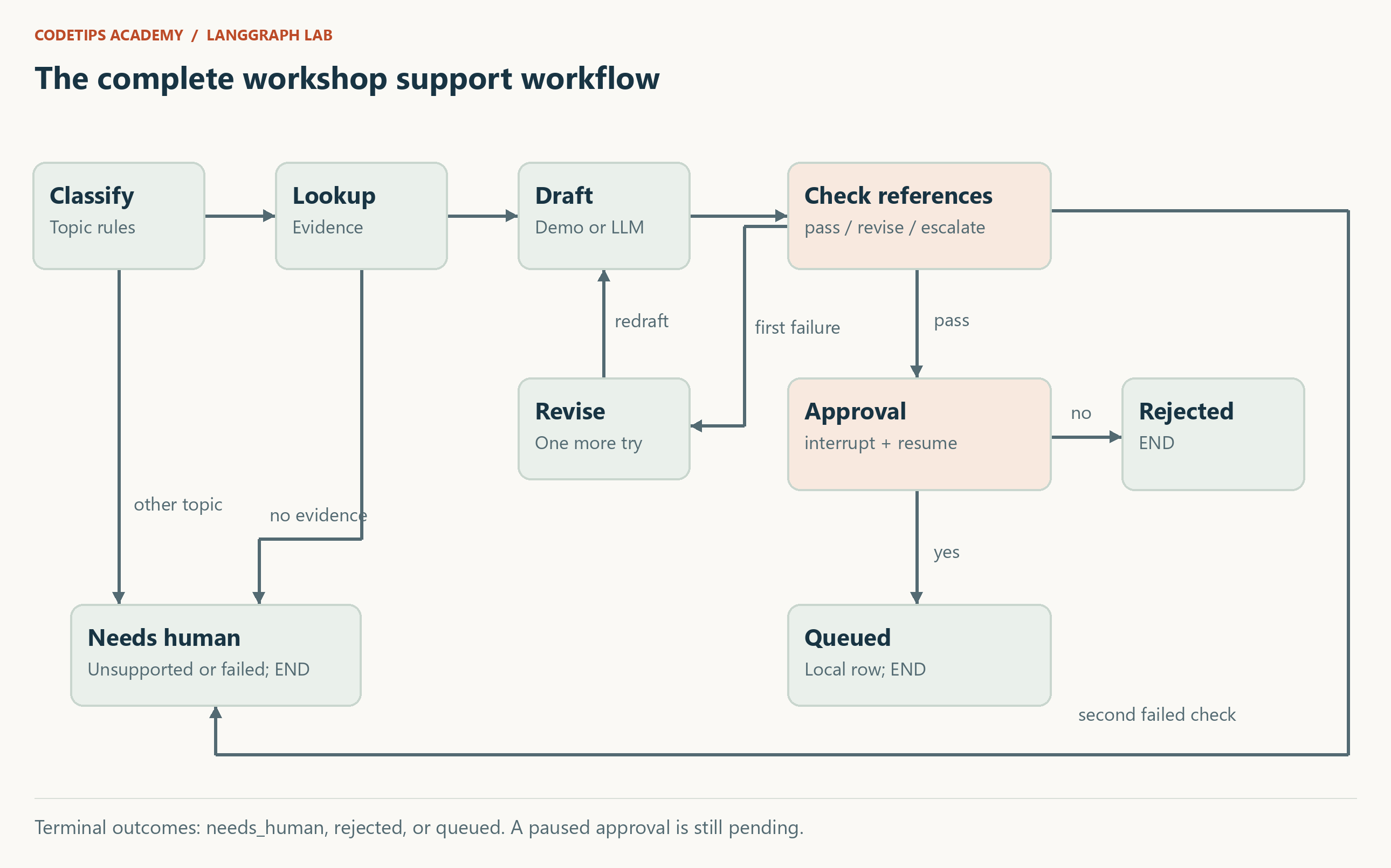
Understand the final graph's exits
There are three normal outcomes after processing or review:
| Outcome | Meaning |
|---|---|
needs_human |
Unsupported topic, missing evidence, or exhausted draft attempts |
rejected |
A reviewer explicitly declined the draft |
queued |
A reviewer approved and the local outbox row was recorded |
A pending approval is different from all three completed outcomes. Its saved snapshot has approval in the next list. An unexpected persistent lookup exception can also stop execution; this is a failure, not a successful escalation result.
The graph builder in workflow.py connects these outcomes explicitly. The generated assets/final-graph.mmd file also records the executable graph's Mermaid representation. The editorial PNG simplifies its layout for reading; the source graph and tests determine behavior.
Run one complete ticket
After installing the locked dependencies and the editable package as described in article 2, run these commands from the repository root. Use a new ticket ID if you have already completed this example.
python -m support_desk start --id demo-101 --text "My pip install has a missing module" --stream
python -m support_desk status --id demo-101
python -m support_desk outbox
The progress output identifies completed node updates. The final JSON includes the original question, category, retrieved evidence, reply, citations, event list, and pending review payload. The outbox should still be empty if you have not approved any tickets in this data directory.
Read the draft and evidence. Then approve it:
python -m support_desk approve --id demo-101
python -m support_desk outbox
The saved outcome becomes queued, and the outbox contains one row for demo-101. Approval means “record this local reply for this ticket,” not “send an email to a real learner.” There is no recipient address in the example queue.
The commands use the same checkpoint file and thread ID to continue the saved run. If you run from a different directory, explicitly provide the same data location before the subcommand:
python -m support_desk --data-dir .runtime status --id demo-101
Exercise rejection and escalation
Create a second technical ticket and reject its draft:
python -m support_desk start --id demo-102 --text "My ESP32 serial port is missing"
python -m support_desk reject --id demo-102
Its outcome is rejected, and there should be no outbox row for that ID. Next, submit a billing request:
python -m support_desk start --id demo-103 --text "Please refund my Python workshop"
This takes the billing branch and ends with needs_human. It does not prepare a technical draft, pause at approval, or perform a financial action. The example sentence “My camera image is purple” also escalates because our tiny knowledge collection has no matching note, even though the classifier recognizes a hardware topic.
Try approving the already finished first ticket. The CLI returns an error instead of treating it as a new approval. Try starting the same ID with different text. That also returns an error. These guards keep the tutorial's one-ticket-per-thread contract understandable.
Test behavior that matters
Run:
python -m pytest -q
The suite checks approval before queue writes, rejection, thread isolation, restart persistence, malformed decisions, bounded draft revision, transient and persistent lookup failures, citation mismatches, duplicate queue writes, conflicting queue payloads, model-response parsing, and the local fake-model HTTP contract. It also executes the lesson scripts.
One particularly useful test starts a ticket in a fresh Python process, inspects it in another process, and approves it in a third. That exercises the SQLite boundary rather than merely reusing one in-memory object.
Another test confirms that a real-looking source marker does not prove a claim. Keep that test: it documents a limitation reviewers and future maintainers must understand.
The verification report records the actual test count and environment used for this edition. A CI workflow is included for Windows and Linux on Python 3.12, but its results will exist only after you publish and run it. Local preparation on Windows does not establish Linux verification.
Evaluate with a fixed, labeled dataset
Run:
python tools/evaluate.py
The evaluator reads twelve synthetic tickets from data/evaluation.jsonl. Each has an expected category, expected pending/completed outcome, and an expected document where applicable. It uses the demo backend and never approves the paused drafts.
For the included edition, the expected summary is twelve passing regression cases. A “pass” means that the rules selected the expected category and route and included the expected document ID for those examples. It does not measure real-world support accuracy, semantic answer quality, or any language model's capabilities.
To extend the dataset, add a question you actually want the tutorial system to handle and label it before changing the code. If a keyword rule fails, preserve the example as a regression. A test set written only to mirror the current implementation cannot reveal much about behavior you have not considered.
Prepare a repository someone can use
The package includes article Markdown, standalone HTML pages, HTML fragments, original diagrams, lesson sources, final code, tests, a dependency lock, a license, a quickstart, and publishing notes. The article ZIPs contain the same tested repository plus a selected-article pointer. They are convenient reading bundles, not eight divergent implementations of the final application.
Keep .runtime, virtual environments, local model files, and credentials out of Git. The included .gitignore handles the tutorial's generated databases and caches. Review your own additions before publishing.
The article source links are currently repository-relative. After choosing the GitHub repository and branch or commit, you can convert those links into hosted code references. Use a fixed commit when you want an article to point to exactly the code it describes. The publishing guide explains this handover without inventing a repository URL in advance.
You now have a small system whose routes, pauses, failures, and side effects you can explain. A useful next extension is a reviewed web interface around the same application contract. Authentication, authorization, retention policy, broader retrieval evaluation, and actual message delivery should be designed explicitly if that extension becomes a real service.
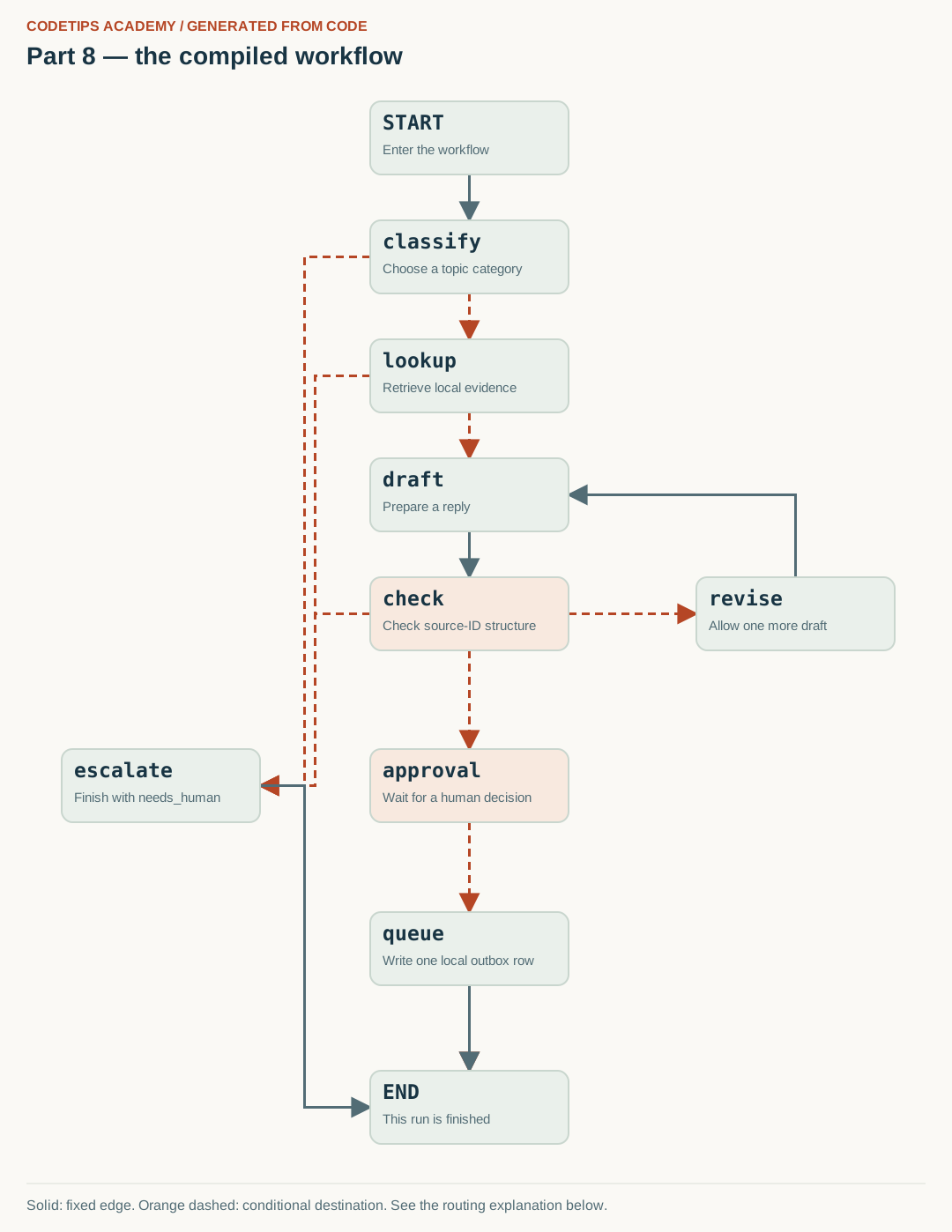
Generate and explain the graph built by this code
The diagram below is generated from this lesson's compiled get_graph() nodes and edges. Node positions are chosen for readability; the connections come from the Python graph, rather than being copied from a generic illustration.
The following excerpt is inside the complete builder function. Node functions are defined earlier in the linked source file; run the lesson or final package rather than pasting this excerpt by itself.
builder = StateGraph(TicketState)
builder.add_node("classify", classify)
builder.add_node("lookup", lookup, retry_policy=RetryPolicy(
    max_attempts=3, initial_interval=0.01, jitter=False, retry_on=ConnectionError))
builder.add_node("draft", draft)
builder.add_node("check", check)
builder.add_node("revise", revise)
builder.add_node("approval", approval)
builder.add_node("queue", queue)
builder.add_node("escalate", escalate)
builder.add_edge(START, "classify")
builder.add_conditional_edges("classify", after_classify, ["lookup", "escalate"])
builder.add_conditional_edges("lookup", after_lookup, ["draft", "escalate"])
builder.add_edge("draft", "check")
builder.add_conditional_edges("check", after_check, ["approval", "revise", "escalate"])
builder.add_edge("revise", "draft")
builder.add_conditional_edges("approval", after_approval, ["queue", END])
builder.add_edge("queue", END)
builder.add_edge("escalate", END)
return builder.compile(checkpointer=checkpointer)
After installing the project, run this command from its root:
python tools/render_graphs.py --part 8
It writes assets/generated/part-08.svg (the image), .mmd (Mermaid source), and .json (the captured nodes and edges). Rendering is local and does not call a model or a remote image service. If you add nodes, update the layout positions in the renderer as well.

Read the arrows with the code
- Follow a supported ticket: START → classify → lookup → draft → check → approval → queue → END is the approved path.
- Follow a rejected ticket: The path stops at approval until a decision arrives. Rejection goes to END and creates no outbox row.
- Follow an unsupported ticket: Classification, missing evidence, or exhausted draft checks can lead to escalate → END.
- Read the loop separately: revise → draft permits one additional drafting attempt. Checkpoints preserve progress; the outbox operation independently protects repeated writes.
Solid lines are fixed transitions. Orange dashed lines mark possible conditional destinations; the routing function chooses the destination for a particular run. A node can contain several Python operations that are not separate graph nodes.
This is an educational project using fictional workshop notes and synthetic tickets. It does not access the real CodeTips Academy website or send email. Downloadable code is provided above. GitHub source links will be added after the repository is published.