
Part 1 of 8 · Basic Python is enough · Tested with Python 3.12.4, LangGraph 1.2.16 and SQLite checkpointer 3.1.2.
Start with a small working program, learn what a workflow means, and identify the problems a graph will help us organize.
A project you can understand before learning a framework
Imagine you help teach a programming workshop. Learners send questions such as “My Python module is missing,” “My ESP32 port disappeared,” or “Can I get a refund?” You want a tool that prepares useful replies while keeping a person responsible for reviewing them.
We will build that tool over eight articles. It will classify a question, look up a few local workshop notes, draft a reply, check the source references, and pause for a human decision. The final version will remember its place after the Python process exits. It will place approved replies in a local queue. There is no email integration to configure or accidentally trigger.
Today, make the smallest part work: receive text, clean its spacing, and prepare a fixed reply. A program that always returns the same suggestion is intentionally limited. It gives us a baseline we can run and inspect before adding branches or a language model.
What is a workflow?
A workflow is a set of steps with rules for moving between them. A normal Python script can implement one. For example, reading a CSV, validating rows, calculating totals, and exporting a report is a workflow.
Our first support workflow has one path:
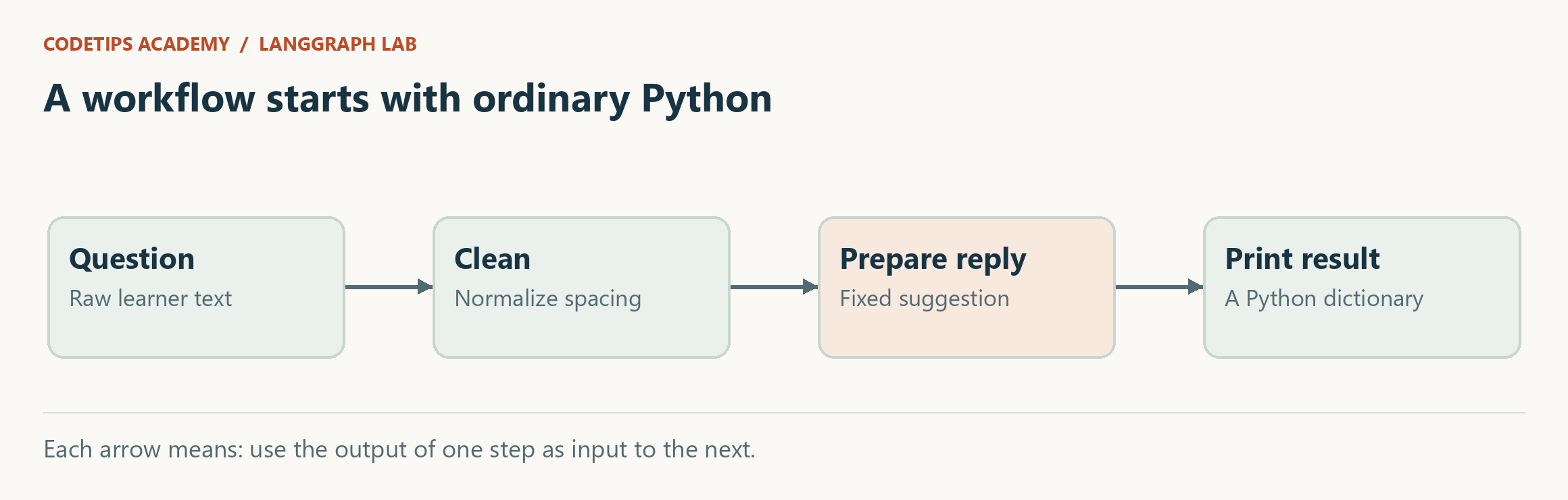
Nothing in this diagram requires AI. Later, one of these steps may call a model, but the surrounding program must still decide what inputs it accepts and when a reply can leave the drafting stage.
LangGraph supplies orchestration for stateful workflows, including workflows that combine ordinary Python and model calls. You do not need to learn the separate LangChain framework before running this series. We will use LangGraph's graph API directly. Official overview
Run the first program
Extract the ZIP. Open a terminal in the directory containing README.md, pyproject.toml, and lessons. You need Python 3.11 or newer; the included verification used Python 3.12.4.
For this first lesson, no third-party packages are required:
python lessons/01_plain_python/main.py
If your operating system uses python3, use that executable instead. This command runs a file; it does not install anything or contact a model service.
Here is the complete program:
"""Article 1: the smallest working support reply, using Python only."""
import json

def clean(text):
    return " ".join(text.split())

def prepare_reply(text):
    cleaned = clean(text)
    return {"text": cleaned,
            "reply": "Check that you installed the package into the Python environment you are running."}

if __name__ == "__main__":
    print(json.dumps(prepare_reply("  My Python module   is missing.  "), indent=2))
Read it from the bottom. The if __name__ == "__main__": block runs when you execute this file directly. It calls prepare_reply with one example question, then prints the returned dictionary as indented JSON.
Inside clean, text.split() produces a list of words. When no separator is supplied, it treats runs of whitespace as separators. Joining those words with one space gives us a predictable sentence. We keep capitalization because cleaning spacing does not require changing how the learner wrote their message.
prepare_reply returns two named values. The text field contains the cleaned input. The reply field contains a fixed suggestion. A dictionary is useful here because another function can request result["reply"] without remembering whether the reply was the first or second item in a tuple.
Expected output:
{
  "text": "My Python module is missing.",
  "reply": "Check that you installed the package into the Python environment you are running."
}
Follow one value through the program
Before cleaning, the example includes spaces at both ends and several spaces between module and is. After cleaning, there is one space between words. After reply preparation, the result contains the cleaned question and a suggestion.
This is the habit to carry through the series: after each step, ask what information exists now and which step created it. Once we add a graph, we will call this evolving collection of named values the state.
The current cleaned variable exists only while prepare_reply is running. Returning it inside the dictionary makes it available to the caller. If we wanted to debug the workflow tomorrow, the returned values would be more useful than a function that only prints “done.”
Be precise about what this program can do
The program does not diagnose the question. Change the input to “Please refund my workshop” and it still suggests checking the Python environment. That is a visible limitation, not a hidden success rate.
This limitation motivates the next features. Routing will separate technical questions from requests needing a person. Retrieval will choose relevant notes. Approval will stop a draft from being treated as a sent reply. We will add each responsibility where it becomes necessary.
We also have no saved state. When the process ends, its dictionaries disappear. Printing JSON does not create a database or a resumable workflow. Persistence arrives in article 5, after you can already recognize the data that must be saved.
Try two small changes
First, change the example to include tabs and line breaks. Run it again and compare the cleaned sentence. Explain why split() handles these separators without a special loop.
Second, add a length field containing len(cleaned) to the returned dictionary. This is deliberately a Python exercise: you should be comfortable reading and changing the data before a framework manages it.
If the command says the file cannot be found, check your current directory. You should be in the repository root, not inside articles or lessons. If you see a Python syntax error after editing, compare the quotes and indentation against the original file.
Check your understanding
You should now be able to describe the input, the two transformations, and the output without using the word “agent.” You should also be able to explain why the fixed reply is insufficient for varied questions.
In the next article, we will keep the steps simple and place them inside a LangGraph graph. The important change will be how we describe and pass the workflow's state.
This is an educational project using fictional workshop notes and synthetic tickets. It does not access the real CodeTips Academy website or send email. Downloadable code is provided above. GitHub source links will be added after the repository is published.


