Part 3 of 8 · Basic Python is enough · Tested with Python 3.12.4, LangGraph 1.2.16 and SQLite checkpointer 3.1.2.
Give technical questions and human-only requests different paths, and keep a readable log of the nodes that ran.
The first decision our support tool must make
Our graph can clean a question and prepare a reply. It still treats every question alike. A learner asking about pip and a learner requesting a refund should not receive the same automatic response.
This lesson builds a small classifier with ordinary Python rules. Technical categories go to a technical branch; billing and unknown categories go to a human branch. A language model is unnecessary for learning this control flow. Later, we will add a model to drafting while keeping these routing rules visible and testable.
Run the installed project's virtual-environment Python from the repository root:
python lessons/03_routing/main.py
The script processes two synthetic questions so you can compare their paths.
Keep classification and routing separate
Classification answers “What kind of question is this?” Routing answers “Which step should run next?” Keeping these as separate functions helps us inspect the category before translating it into a destination.
The classifier lives in src/support_desk/knowledge.py, a small shared module. Importing a helper does not mean another service is running. It is the same idea as importing one of your own Python files.
def tokens(text: str) -> set[str]:
    return set(re.findall(r"[a-z0-9]+", text.lower()))

def classify_rules(text: str) -> str:
    words = tokens(text)
    # Billing always goes to a person, even if technical words also appear.
    if words & {"refund", "payment", "invoice", "charge", "billing"}:
        return "billing"
    if words & {"esp32", "port", "serial", "usb", "board", "camera"}:
        return "hardware"
    if words & {"python", "pip", "venv", "install", "module", "import", "environment"}:
        return "setup"
    return "other"
tokens converts the text into a set of lowercase words. A set supports intersection: words & {"refund", "payment"} contains whichever of those words appear in the ticket. A nonempty set is true in an if condition.
The order of the checks matters. “Refund my Python workshop” contains both a billing word and a programming word. Billing is checked first, so this mixed request follows the billing rule. These rules belong to this tutorial, not to an actual refund policy for CodeTips Academy.
The classifier is deliberately narrow. It recognizes listed words, not every possible spelling, language, or paraphrase. If a category is uncertain because no rule matches, other sends it to a person. We will evaluate the limitations instead of calling a few examples general language understanding.
Add a category and an event list to state
class State(TypedDict, total=False):
    text: str
    category: str
    reply: str
    events: Annotated[list[str], add]
The new category field records the classification. The events list records brief descriptions such as "classify:setup" and "technical".
Annotated[list[str], add] associates the list with the add reducer. For this field, separate node updates are combined by concatenation. A node returns only the events it just produced; it should not return the entire accumulated event list again. The graph API supports field-specific update behavior through reducers. State and reducers
Suppose the initial list is []. The classifier returns ["classify:setup"], then the technical node returns ["technical"]. The final list contains both. If the second node returned the old list plus its new item, the reducer would append the old entries a second time. This is an easy duplication bug to reproduce and then avoid.
Make the branch visible
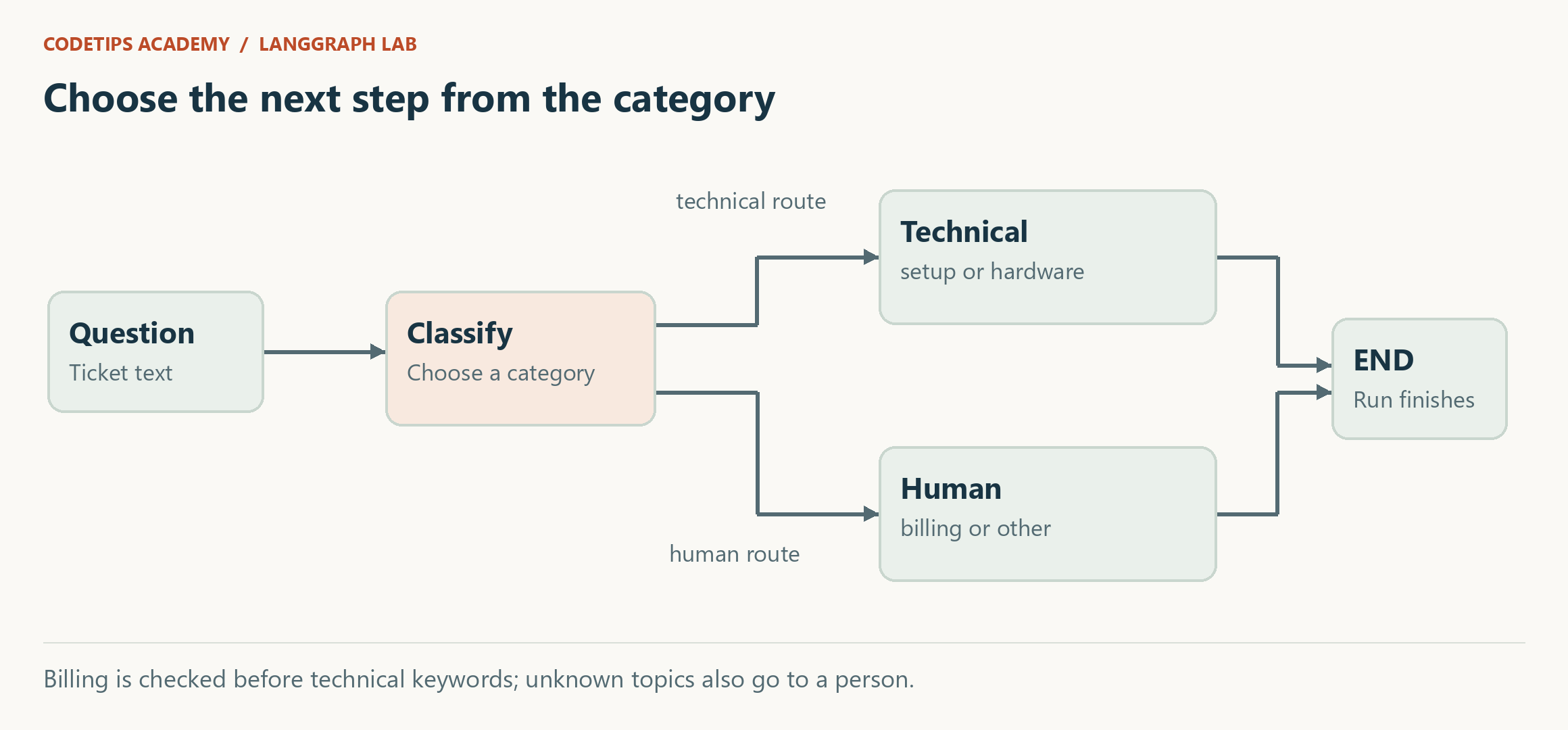
The routing function returns a node name:
def route(state):
    return "technical" if state["category"] in {"setup", "hardware"} else "human"
It does not change state. It reads the category that classify produced and selects the next destination.
The corresponding graph registration is:
builder.add_edge(START, "classify")
builder.add_conditional_edges("classify", route, ["technical", "human"])
builder.add_edge("technical", END)
builder.add_edge("human", END)
Generate and explain the graph built by this code
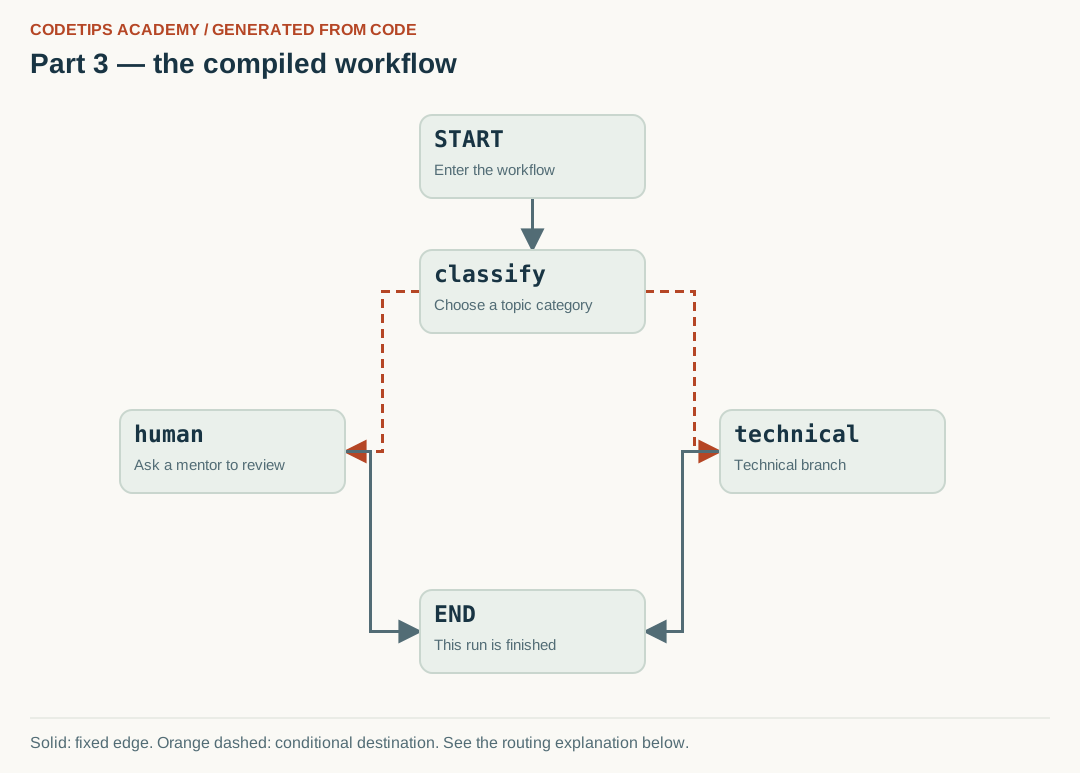
The diagram below is generated from this lesson's compiled get_graph() nodes and edges. Node positions are chosen for readability; the connections come from the Python graph, rather than being copied from a generic illustration.
The following excerpt is inside the complete builder function. Node functions are defined earlier in the linked source file; run the lesson or final package rather than pasting this excerpt by itself.
builder = StateGraph(State)
for name, fn in [("classify", classify), ("technical", technical), ("human", human)]:
    builder.add_node(name, fn)
builder.add_edge(START, "classify")
builder.add_conditional_edges("classify", route, ["technical", "human"])
builder.add_edge("technical", END)
builder.add_edge("human", END)
return builder.compile()
After installing the project, run this command from its root:
python tools/render_graphs.py --part 3
It writes assets/generated/part-03.svg (the image), .mmd (Mermaid source), and .json (the captured nodes and edges). Rendering is local and does not call a model or a remote image service. If you add nodes, update the layout positions in the renderer as well.

Read the arrows with the code
- classify → technical: The router selects this destination for setup or hardware categories.
- classify → human: Billing and other categories take this destination. Orange dashed edges are choices, not simultaneous execution.
- technical/human → END: Both branches finish. The human branch here returns a result; it does not pause for a decision yet.
Solid lines are fixed transitions. Orange dashed lines mark possible conditional destinations; the routing function chooses the destination for a particular run. A node can contain several Python operations that are not separate graph nodes.
The allowed destinations make this graph's possibilities explicit. The complete runnable builder is in the lesson file; it registers the functions before connecting them. See the official examples for conditional transitions. Use the graph API
Do not add an unconditional classify -> technical edge alongside the conditional routing and expect it to behave like an else. That would describe an additional transition. Our design gives the classifier one routing decision.
Read the two outputs
For “My Python module is missing,” the important fields are:
{
  "category": "setup",
  "reply": "Next we need a relevant workshop document.",
  "events": ["classify:setup", "technical"]
}
For “Please refund my Python workshop,” they are:
{
  "category": "billing",
  "reply": "A mentor must review this request.",
  "events": ["classify:billing", "human"]
}
The event log lets us explain the result without guessing which functions ran. These are application events we wrote ourselves. They are not model thoughts, hidden reasoning, or automatic explanations generated by LangGraph.
The word human here names a completed branch. It does not yet pause the program for somebody to press a button. This version returns a message saying human review is required. Article 5 will introduce a real resumable pause.
Test the boundaries, not only the happy path
Try “The ESP32 serial port is missing.” The classifier should produce hardware, and the graph should take technical. Then try “Tell me a joke.” It should produce other, leading to human.
Now try “Refund my ESP32 workshop.” Before running it, explain why the hardware keyword does not determine the route. If a later edit moves the hardware rule above billing, this example will expose the behavior change.
For an exercise, add a new setup keyword, run an example that uses it, and add a regression test when you reach article 8. Avoid changing several routing rules at once; a small edit with a clear example is easier to reason about.
You now have explicit decisions and an execution history. The technical branch still lacks useful evidence. In the next article, we will replace its placeholder reply with document lookup and a bounded draft-check loop.
This is an educational project using fictional workshop notes and synthetic tickets. It does not access the real CodeTips Academy website or send email. Downloadable code is provided above. GitHub source links will be added after the repository is published.